
Download Slatebox – AI‑Powered Collaborative Visualization Tool
Intro: Why Slatebox Stands Out in Modern Visual Collaboration
In today’s fast‑paced remote‑first work environment, teams need a visual canvas that not only captures ideas but also accelerates the transformation of those ideas into actionable diagrams. Slatebox answers that call by merging a robust diagramming engine with generative AI, turning natural‑language prompts into fully editable visuals in seconds. Whether you are a product manager mapping a user journey, a developer designing a micro‑service architecture, an educator illustrating complex concepts, or a strategist sketching a business model, Slatebox provides a flexible, secure, and collaborative space.
Its AI assistant can read meeting notes, URLs, or plain text and instantly populate sticky notes, shapes, and connectors, drastically cutting down the time spent on manual drawing. Moreover, the platform supports real‑time multi‑cursor editing, meaning every participant sees changes live, eliminating the need for endless screen‑sharing sessions. With native integrations for Microsoft Teams, Slack, GitHub, Confluence, and Zapier, Slatebox fits naturally into existing workflows, while its open API enables developers to embed canvases directly into internal tools or public portals.
The free tier offers enough capability to evaluate the product without any commitment, and the scalable paid plans unlock unlimited boards, advanced AI features, and enterprise‑grade security controls. In short, Slatebox is designed to be the go‑to visual collaboration hub for teams that value speed, clarity, and seamless integration.
Features & Core Functionalities That Power Your Visual Projects
Slatebox’s feature set is built around three core pillars: AI‑driven creation, collaborative flexibility, and extensibility through integrations and APIs. The AI engine can interpret a simple sentence—such as “show the onboarding flow for a SaaS product”—and instantly generate a polished diagram with appropriate shapes, connectors, and even suggested color palettes. This eliminates the repetitive task of manually dragging and linking elements, freeing up mental bandwidth for strategic thinking.
Real‑time collaboration is enhanced by multi‑cursor support, live comments, and version history, ensuring that every stakeholder can contribute simultaneously without overwriting each other's work. The platform also offers a massive library of over five million shapes, icons, and smart color suggestions, guaranteeing visual consistency across projects. For teams that rely on other tools, Slatebox’s native connectors to Microsoft Teams, Slack, GitHub, Confluence, and Zapier enable automated updates, notifications, and data synchronization, making it a true hub in the productivity stack.
Finally, the RESTful API and magic‑link sharing give developers the power to embed canvases, trigger diagram generation, or pull snapshot exports directly from their own applications, turning Slatebox into a programmable visual engine.
- AI‑Driven Diagram Generation: Type a natural‑language prompt and watch Slatebox auto‑populate a ready‑to‑edit diagram.
- 5 Million+ Shapes & Smart Color Picker: Massive icon library with AI‑suggested palettes for brand‑consistent visuals.
- 100+ Templates: Pre‑built canvases for flowcharts, mind maps, org charts, journey maps, SWOT analyses, and more.
- Real‑Time Multi‑Cursor Collaboration: Live cursors, comments, and edits keep teams synchronized.
- Sticky‑Note Auto‑Population: AI converts meeting minutes or documents into actionable sticky notes.
- Third‑Party Integrations: Connectors for Microsoft Teams, Slack, GitHub, Confluence, Zapier, and more.
- API & Magic Links: Embed visualizations in dashboards or share one‑click edit links.
- Auto‑Snapshots & Version History: Every change is saved; revert to any prior state instantly.
- Community Slates: Browse and publish public canvases for inspiration and collaboration.
- Free Tier & Scalable Pricing: Start free, upgrade for unlimited shapes, advanced AI, SSO, and governance.
Installation, Usage Guide & Compatibility Across Devices
Getting Started – Simple Download & Account Setup
Slatebox is delivered as a SaaS platform, so there is no traditional installer for desktop operating systems. To begin, navigate to the official website, click the “Sign Up – Free” button, and register using your work email, Google, Microsoft, or any SSO provider supported by your organization. After confirming your email address, you are taken directly to the dashboard where you can create a new “Slate” (canvas). For users who prefer a native feel, Slatebox offers optional desktop wrappers built on Electron for Windows, macOS, and Linux. These wrappers can be downloaded from the user profile under “Desktop App,” providing offline caching and system‑level notifications while still relying on the cloud for AI processing and real‑time sync.
Step‑by‑Step Usage Workflow
1. Create a Canvas: Click “New Slate,” choose a template or start from a blank board.
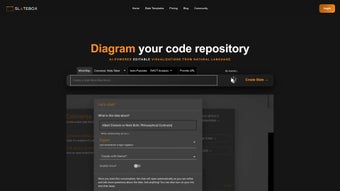
2. Enter an AI Prompt: Use the prompt bar (e.g., “Design a CI/CD pipeline for a micro‑service architecture”).
The AI instantly generates shapes, connectors, and sticky notes.
3. Customize Elements: Drag‑drop shapes, edit text, adjust colors with the smart picker, or add icons from the 5 M+ library.
4. Invite Collaborators: Share via email invite or generate a magic link.
Each participant’s cursor is labeled with their name for clear identification.
5. Integrate Tools: Open the “Integrations” tab to link Slack channels (auto‑post updates), GitHub repositories (embed issue cards), or Microsoft Teams (push snapshots).
6. Save & Export: All changes are auto‑saved.
Export options include PNG, PDF, SVG, or embed code for websites and internal portals.
7. Version Control: Access the version history panel to revert to any previous state or compare changes side‑by‑side.
Operating System Compatibility & Mobile Access
Because Slatebox runs primarily in the browser, it works on any modern OS that supports Chrome, Edge, Firefox, or Safari. The optional desktop wrappers are officially supported on:
- Windows 10/11 (64‑bit)
- macOS 12 Monterey and later
- Ubuntu 20.04 LTS and other major Linux distributions
Mobile applications are available for iOS 15+ and Android 8+, offering a streamlined touch interface for quick annotations, sticky‑note additions, and canvas reviews while on the go. All platforms benefit from end‑to‑end encryption (TLS 1.2+ in transit, AES‑256 at rest) and comply with GDPR, CCPA, and ISO‑27001 standards for enterprise security.
Pros, Cons, Frequently Asked Questions
Pros of Using Slatebox
- AI‑driven prompt generation dramatically speeds up diagram creation, cutting design time by up to 70%.
- Extensive shape library and smart color picker ensure professional, brand‑consistent visuals.
- Real‑time multi‑cursor collaboration eliminates the need for separate screen‑sharing tools.
- Deep integrations with Teams, Slack, GitHub, Confluence, and Zapier streamline workflow automation.
- Free tier provides ample functionality for small teams, freelancers, or trial users.
- Robust version history and auto‑snapshot features safeguard work and simplify rollback.
- API and magic‑link sharing enable programmable embedding and custom automation.
Cons to Consider
- Advanced AI features (e.g., bulk diagram generation, custom model training) are locked behind paid plans.
- Very large canvases with thousands of elements may experience slight performance lag in the browser.
- Desktop wrappers consume additional memory compared to pure web usage.
- Learning curve for developers unfamiliar with RESTful API or custom integration scripting.
- Offline mode is limited; full AI functionality requires an active internet connection.
Frequently Asked Questions
Is Slatebox truly free, or are there hidden costs?
Slatebox offers a free plan that includes up to three active canvases, 100 MB of storage, and basic AI prompts. Premium features—unlimited boards, advanced AI assistance, SSO, and priority support—require a paid subscription. Pricing is transparent on the website, and there are no hidden fees.
Can I import existing diagrams from other tools?
Yes. Slatebox supports importing SVG, Visio (VSDX), and Lucidchart files. Imported elements are automatically converted into editable Slatebox shapes, preserving layout and styling as much as possible.
How secure is the data stored in Slatebox?
All data is encrypted in transit (TLS 1.2+) and at rest (AES‑256). Enterprise plans add SSO, audit logs, role‑based access control, and data residency options for GDPR‑compliant regions.
Is there an offline mode for working without internet?
The desktop wrapper offers a limited offline cache that stores the last opened canvas. Changes sync automatically once the device reconnects. Full AI generation still requires an online connection.
How does the API integration work?
Slatebox provides a RESTful API with endpoints for creating canvases, adding shapes, and exporting snapshots. API keys are generated in user settings, and the documentation includes example cURL commands and SDKs for JavaScript, Python, and Java.
Conclusion – Should You Download Slatebox?
Slatebox delivers a compelling blend of AI‑enhanced diagramming, real‑time collaboration, and deep integration capabilities that make it a strong contender in the visual productivity market. Its natural‑language prompt engine removes the tedious manual work of building diagrams, while the extensive shape library and smart color picker ensure that every canvas looks polished and consistent. Teams that already rely on Slack, Teams, or GitHub will appreciate the seamless connectors that keep information flowing without extra steps.
The free tier provides enough functionality to test the platform, and the scalable paid plans unlock powerful features for larger organizations that need governance, SSO, and unlimited AI assistance. If your workflow demands quick visual communication, secure cloud storage, and the ability to embed visualizations into other tools, Slatebox is a smart, future‑ready investment. Download Slatebox today, start with the free plan, and experience how AI can transform your brainstorming sessions into actionable, shareable diagrams.



.png)



